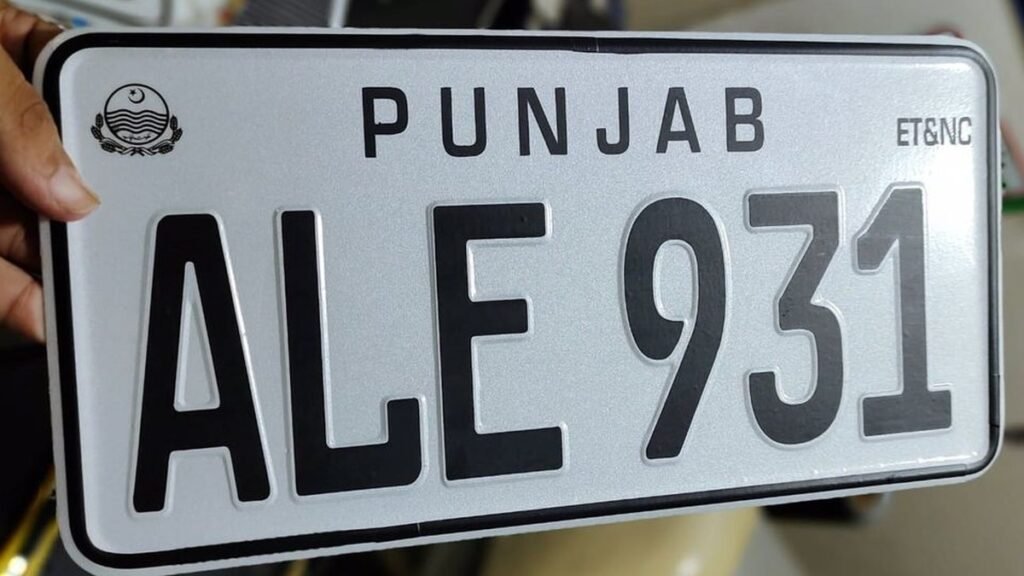
Disclaimer: UrduPro is not affiliated with the Punjab Excise & Taxation Department or any government body. This is an independent informational guide. Always verify your vehicle on the official portals linked below.
MTMIS Punjab Vehicle Verification Online 2026: Complete Guide
Buying a used car or motorcycle in Punjab? The single most important step before paying a single rupee is verifying the vehicle through MTMIS Punjab — the official online system run by the Punjab Excise & Taxation Department. MTMIS (Motor Transport Management Information System) lets you check a vehicle’s registration, ownership, engine and chassis numbers, and token tax status in seconds, either online or by SMS.
This guide walks you through every verification method available in 2026: the official web portal, the SMS codes for all four provinces, how to read each field in the result, what to do when you get a “no record found” message, and a complete pre-purchase checklist so you never buy a stolen, non-custom-paid, or tax-defaulter vehicle.
What Is MTMIS Punjab and Why It Matters
MTMIS Punjab is the digitised vehicle registration database of the Punjab Excise & Taxation Department. Every vehicle registered in Punjab — cars, motorcycles, rickshaws, commercial vehicles — is recorded in this system with its registration number, owner’s name, engine number, chassis number, vehicle make and model, year of manufacture, and the complete token tax payment history.
Before MTMIS went online, buyers had to visit the Excise office in person, wait in queues, and sometimes rely on touts. Today the same information is available from your phone. Checking takes less than a minute, and it protects you from the most common used-car frauds in Pakistan:
- Stolen vehicles sold with tampered registration documents
- Non-custom-paid (NCP) vehicles with fake or duplicate registration numbers
- Token tax defaulters — unpaid taxes transfer to the new owner
- Mismatched engine/chassis numbers indicating a cut-and-shut or reassembled vehicle
- Duplicate registration books issued against a single number plate
If the MTMIS record does not match the physical vehicle or the seller’s documents, walk away from the deal. No discount is worth buying a disputed vehicle.
Method 1: Verify on the Official MTMIS Punjab Web Portal
The most detailed verification method is the official web portal. Here is the exact process:
- Open the official MTMIS Punjab verification page at mtmis.excise.punjab.gov.pk (always type the address yourself; never click links forwarded on WhatsApp).
- Enter the vehicle’s registration number in the search box — for example, LHR-1234 or ICT-5678. You generally do not need the dashes; the portal accepts the number with or without them.
- Complete the captcha/security check shown on the page.
- Click the Search/Verify button.
- The system displays the complete vehicle record within a few seconds.
What the portal result shows you:
- Registration number — must match the number plate exactly
- Owner’s name — must match the seller’s CNIC name (ask to see the original CNIC)
- Vehicle make, model and year — e.g. “Toyota Corolla 2019”
- Engine number — compare digit-by-digit with the engine bay stamping
- Chassis number — compare with the chassis plate/VIN plate on the vehicle
- Registration date — when the vehicle was first registered
- Token tax status — paid up to which year, and whether any amount is outstanding
- Vehicle status — active, transferred, or flagged
Print or screenshot this result. It is your evidence if any dispute arises later.
Method 2: Verify by SMS — Codes for All Provinces
No internet? The Excise departments of all provinces run SMS verification services. Send the vehicle’s registration number (without dashes or spaces, e.g. LHR1234) to the code for the province where the vehicle is registered:
| Province / Territory | SMS Code | Format to Send |
|---|---|---|
| Punjab | 8785 | LHR1234 → 8785 |
| Sindh | 8147 | KHI1234 → 8147 |
| Khyber Pakhtunkhwa | 9818 | PES1234 → 9818 |
| Islamabad (ICT) | 8521 | ICT1234 → 8521 |
You receive an SMS reply with the vehicle make, model, year, owner name, and token tax status. Standard SMS charges apply. Keep the reply message saved — it is dated proof of the verification.
Important: These SMS short codes are the official ones. If any website or “agent” gives you a different number to send vehicle details to, do not use it — it may be a data-harvesting scam.
How to Read Each Field in the MTMIS Result
Knowing what each field means helps you spot problems the seller hopes you will miss:
Owner name vs seller identity
The owner name in MTMIS must match the CNIC of the person selling you the vehicle. If the seller says “it’s my brother’s car” or “transfer is pending,” insist on meeting the registered owner or completing the transfer at the Excise office before payment. Buying from a non-owner is the most common route to a disputed vehicle.
Engine and chassis numbers
Open the bonnet and find the engine number stamping; find the chassis/VIN plate (usually on the dashboard near the windscreen or on the driver-side door frame). Every character must match the MTMIS record. A single mismatched digit means the engine was swapped without updating records — or worse, the vehicle is assembled from parts of multiple vehicles.
Token tax status
The record shows token tax paid up to a specific year. If tax is outstanding, the liability transfers to you as the new owner, plus late-payment surcharges. Deduct the outstanding amount (plus a margin for penalties) from the price — or better, require the seller to clear it and show you the updated record before you pay.
Registration date vs model year
A “2019 model” first registered in 2022 may be a reconditioned import or may have sat unregistered — both affect value. Ask why, and check the import documents if it is an imported vehicle.
“No Record Found” — What It Means and What to Do
If the portal or SMS returns no record, do not assume it is a system glitch. Work through this diagnostic:
- Check your input. Retype the registration number carefully — a single wrong letter (e.g. B vs 8, O vs 0) produces no result. Try with and without the dash.
- Confirm the province. A Lahore-registered car will not appear in the Sindh system and vice versa. Verify which province issued the number plate and use the matching portal/SMS code.
- Try the SMS method if the web portal fails — the databases sometimes sync at different times.
- Check for very old registrations. Some pre-digitisation records were never fully migrated. The Excise office can confirm these manually.
- Treat a persistent “no record” as a red flag. If the number is entered correctly, the province is right, and both web and SMS return nothing, the registration is very likely fake. Do not proceed with the purchase. You can also verify through the Excise helpline or by visiting the relevant Excise office with the registration book.
Pre-Purchase Verification Checklist (Save This)
Run through this list for every used vehicle you consider buying in Punjab:
- ☐ MTMIS web portal record matches the number plate, make, model and year
- ☐ Owner name in MTMIS matches the seller’s original CNIC (seen in person, not a photo)
- ☐ Engine number on the vehicle matches MTMIS digit-by-digit
- ☐ Chassis/VIN number on the vehicle matches MTMIS digit-by-digit
- ☐ Token tax is paid up to date — no outstanding dues
- ☐ Original registration book (“copy”) seen and matches MTMIS data
- ☐ For imported vehicles: original import documents, auction sheet and duty receipts seen
- ☐ Vehicle is not listed as stolen — cross-check with the police helpline (15) if anything feels off
- ☐ Transfer form signed and transfer fee understood before payment
- ☐ Payment made via bank transfer/pay order (never cash for large amounts) with a written sale agreement
Token Tax Status: What MTMIS Tells You
The MTMIS record shows token tax paid up to a given year. Token tax in Punjab varies by engine capacity and by whether the owner is a tax filer or non-filer — see our dedicated Token Tax Punjab 2026 guide for the full rate tables and the ePay Punjab payment process.
Key points for buyers:
- Unpaid token tax becomes the buyer’s liability after transfer.
- Late payment attracts surcharges, so “two years unpaid” costs more than two years of tax.
- Always re-check MTMIS after the seller claims to have cleared dues — get the updated screenshot before paying.
MTMIS for Commercial Vehicles: Extra Checks
Buying a commercial vehicle (pickup, truck, bus, rickshaw)? The MTMIS check works the same way, but add these:
- Route permit status: commercial vehicles need valid route permits — confirm separately with the transport authority, as MTMIS focuses on registration and tax.
- Fitness certificate: commercial vehicles require periodic fitness certification. An expired certificate means immediate additional cost.
- Load/weight category: ensure the registered laden weight matches the vehicle’s actual configuration — overloaded-category mismatches cause legal trouble at checkpoints.
- Company vs individual ownership: fleet vehicles may be registered to companies; verify the authorised signatory’s authority to sell.
Common MTMIS Scams and How to Avoid Them
- Fake verification websites: Copycat sites with names like “mtmis-punjab-verify” or misspelt domains show fabricated “verified” results. Only trust mtmis.excise.punjab.gov.pk and the official SMS codes.
- Photoshopped MTMIS screenshots: Sellers sometimes send edited screenshots. Run the check yourself — it takes one minute.
- “Transfer later” promises: If the seller cannot transfer ownership now, the vehicle may have unpaid taxes, a bank lien, or a legal dispute. Insist on transfer at the time of sale.
- Agents demanding “verification fees”: MTMIS web verification is free; SMS costs only the standard message charge. Anyone charging thousands for “online verification” is scamming you.
Official Links
- MTMIS Punjab vehicle verification: mtmis.excise.punjab.gov.pk
- Punjab Excise & Taxation Department: excise.punjab.gov.pk
- SMS verification: Punjab 8785 · Sindh 8147 · KPK 9818 · Islamabad 8521
Frequently Asked Questions
Is MTMIS Punjab vehicle verification free?
Yes. Checking on the official web portal is completely free. The SMS method costs only your network’s standard SMS charge.
What is the SMS code for Punjab vehicle verification?
Send the registration number (without dashes, e.g. LHR1234) to 8785 for Punjab-registered vehicles.
What are the SMS codes for other provinces?
Sindh: 8147. Khyber Pakhtunkhwa: 9818. Islamabad (ICT): 8521. Always send the number to the code of the province where the vehicle is registered.
The portal shows “no record found.” Is the vehicle fake?
Not necessarily — first recheck your spelling, confirm the correct province, and try the SMS method. But if the number is correct and both methods return nothing, treat it as a serious red flag and do not buy without Excise office confirmation.
Can I verify a vehicle from another province on MTMIS Punjab?
No. Each province maintains its own database. Use the SMS code or portal of the province shown on the number plate.
Does MTMIS show whether token tax is paid?
Yes. The record shows token tax paid up to a specific year and any outstanding amount. See our token tax guide for rates and payment methods.
The engine number doesn’t match. What should I do?
Do not buy the vehicle until the discrepancy is explained and documented. A mismatched engine number can indicate an undeclared engine swap, a reassembled vehicle, or fraud. Have it inspected at the Excise office.
Can I transfer ownership online in Punjab?
Transfer procedures have been digitising through the Excise department and the Dastak app. Check the official Excise portal for the current process, since procedures were updated in 2026.
Is the seller’s “original registration book” enough without MTMIS?
No. Registration books can be forged or duplicated. Always cross-check the book against the live MTMIS record yourself.
What should I do if I already bought a vehicle with fake documents?
Report immediately to the police (helpline 15) and the Excise & Taxation Department. Keep all payment evidence, the sale agreement, and the seller’s details. Consult a lawyer before taking further steps.
How do I check if a vehicle is stolen?
MTMIS verification is the first step. If anything looks suspicious, also check with the police helpline 15 and avoid cash deals without a written agreement and CNIC copies.
Does MTMIS work for motorcycles and rickshaws too?
Yes. All registered motor vehicles in Punjab — including motorcycles and rickshaws — are in the MTMIS database and can be verified the same way.
Related Posts
 BISPBISP Payment Not Received? 12-Step Diagnostic Guide (2026) | UrduPro
 BISPPMT Score Check 2026: What It Means, Cut-off & How to Check Your BISP Eligibility Score
 BISPBISP Rs 18,000 January 2027: Confirmed Payment Increase for Benazir Kafalat Beneficiaries
 BISP8171 Error 938 Fingerprint: Complete Biometric Fix Guide (2026)
 BISPDriving License Online Punjab 2026: Dastak App Complete Guide | UrduPro
 BISPPunjab Driving License Scam Alert: Fake Websites & “Without Test” Fraud | UrduPro
Most Popular
BISPPunjab Driving License Scam Alert: Fake Websites & “Without Test” Fraud | UrduPro54 views BusinessTech Stocks Trillion Loss: $1 Trillion Wiped Out as Oil Hits $11043 views
 How-ToPTA Tax Calculator 2026: Check Mobile Tax on Any Phone28 views
 Canada JobsTech Jobs in Canada: Roles, Salaries, and Skills Needed26 views
 TechnologyTecno Mobile Prices in Pakistan 2026: Spark, Camon and Pova Series Compared22 views
 How-ToNADRA Online Services 2026: Apply for CNIC, B-Form and More17 views